I've been remiss in posting my videos. The last two talks went really well
- Platonic Solids of Quality
As people who produce awesome stuff, there are a lot of tools we can use to work less and simplify our workflow. This talk introduces many techniques from Agile Testing and other sources so we can all do more things faster.
- Functional Programming and Django QuerySets
This talk is a quick overview of Python iterators and why to use them, then combining iterators in Functional Programming (vs procedural and object oriented programming). Lastly I show how to use these ideas in order to better understand and test Django QuerySets.
I have another talk video somewhere, but it's about using Selenium for testing and thus has rather a bit of profanity in it. No link.
Thanks to Don Westland for recording-editing these for me!
Showing posts with label django. Show all posts
Showing posts with label django. Show all posts
Tuesday, November 1, 2016


Tuesday, October 4, 2016
talk: Upping Your (Programming) Game
(this page is http://bit.ly/jta-upping)
I'm giving this talk tonight, at LA Django, hosted by our friends at Wiredrive HQ. Thanks for Marcel and Wiredrive for supporting the Los Angeles tech scene!
Slides are in gdrive: Upping Your (Programming) Game.
There will becats Lil Bubzilla.

pic credit: Marcel
I'm giving this talk tonight, at LA Django, hosted by our friends at Wiredrive HQ. Thanks for Marcel and Wiredrive for supporting the Los Angeles tech scene!
Slides are in gdrive: Upping Your (Programming) Game.
There will be

pic credit: Marcel
Monday, September 5, 2016
talk: Platonic Solids of Quality
(This page is bit.ly/jta-platonic )
Slides: John Tells All: Platonic Solids of Quality
Video: Platonic Solids of Quality, John Tells All
Detailed outline on Workflowy
Thanks to Don Westland for the A/V, Marcel for organizing and the picture, DataScience Inc for the hosting, and Keith B. for the presentation and the smooooth scotch.
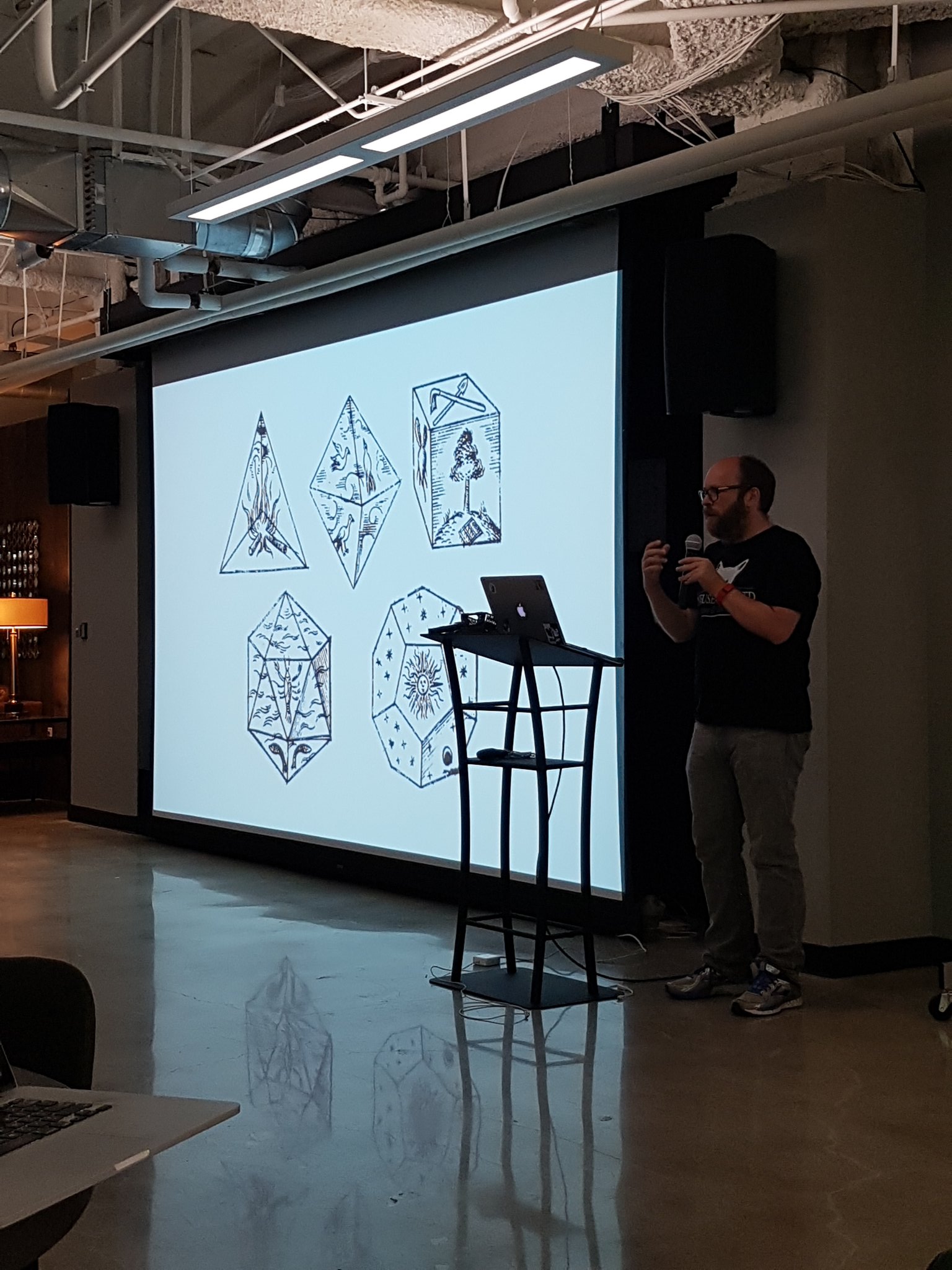
Slides: John Tells All: Platonic Solids of Quality
Video: Platonic Solids of Quality, John Tells All
Detailed outline on Workflowy
Thanks to Don Westland for the A/V, Marcel for organizing and the picture, DataScience Inc for the hosting, and Keith B. for the presentation and the smooooth scotch.
Wednesday, July 6, 2016
Monday, May 30, 2016
Django trick: keep "runserver" from crashing on Python syntax error
When developing Django, the "runserver" command is convenient. It runs our appserver, and reloads itself when we change our app's source code. We can have a rapid "edit stuff then see what happened" cycle.
However, runserver it has an annoying habit. If we're typing so fast that we add a Python syntax error into our code, the command will crash. We expect that when we fix the syntax error, we can see our results, but it doesn't work. The appserver has crashed, and is no more.
The following workaround works wonders. If we add a syntax error, "runserver" will crash, and this loop will wait for a moment then re-run it. We can now type as fast as possible all the time, and Django will always show us what we want to see. Or, what we give it, which sometimes is enough ;)
while true; do ./manage.py runserver; sleep 15; done
However, runserver it has an annoying habit. If we're typing so fast that we add a Python syntax error into our code, the command will crash. We expect that when we fix the syntax error, we can see our results, but it doesn't work. The appserver has crashed, and is no more.
The following workaround works wonders. If we add a syntax error, "runserver" will crash, and this loop will wait for a moment then re-run it. We can now type as fast as possible all the time, and Django will always show us what we want to see. Or, what we give it, which sometimes is enough ;)
while true; do ./manage.py runserver; sleep 15; done
Friday, April 29, 2016
Friday, April 15, 2016
talk: Functional Programming and Django QuerySets soon!

I'll be speaking at the next SoCal Python meetup! http://www.meetup.com/socalpython/events/230329648/ If you want to go, sign up soon, there are only a few spots left.
This talk is mostly about Functional Programming in the Python world. FP is great for testing, but it can be a bit mysterious at times. I highlight the awesomeness of FP, the dangerous bit, and how it is related to Django QuerySets.
I've given this talk a few times, and people always get excited about it. FP is not magic! It's a clean and graceful way to write code.
Here's a link with my previous version's slides, notes, and other references: http://johntellsall.blogspot.com/2014/05/talk-functional-programming-and-django.html
Each time I give a talk I change it up a little or a lot. This time I'll probably add more cat photos.
Friday, August 28, 2015
slides: Practical Python Testing
The talk at The Black Tux last night went really well! Here are the slides:
- Practical Python Testing (google docs)
and me:

- Practical Python Testing (google docs)
and me:

Wednesday, May 21, 2014
talk: Functional Programming and Django QuerySets
 |
For further reference, check the last slide for great stuff to read, or use these links:
Functional Programming HOWTO by Andy Kuchling -- clearly written, with tons of answers to "what?" and "why?", along with lots of Python examples
Can Your Programming Language Do This? by Joel Spolsky -- not Python specific
Wikipedia: Functional Programming -- clear, general use cases
Using Django querysets effectively by Dave Hall -- great, very useful for Django
Thanks to all who came out to learn new stuff. My hour talk was only a brief sketch, but it was a lot of fun to hang out and share knowledge. As always I learn from every single question people have. Thank you so much.
Can Your Programming Language Do This? by Joel Spolsky -- not Python specific
Wikipedia: Functional Programming -- clear, general use cases
Using Django querysets effectively by Dave Hall -- great, very useful for Django
Thanks to all who came out to learn new stuff. My hour talk was only a brief sketch, but it was a lot of fun to hang out and share knowledge. As always I learn from every single question people have. Thank you so much.
Monday, May 20, 2013
trivial Jenkins configuration
Knowing when your software breaks is useful. If you catch subtle errors soon after the change, it's *much* easier to figure out which bit of code "optimization" broke things for the users.
Another benefit is fixing "works for me" syndrome. Even if you're building software just for yourself, it's nice to have a 3rd party to verify that you didn't do silly things. Forgetting to check in South database changes is quite easy, but that simple omission will break everything.
Jenkins is a cranky to set up, because it's a collection of moving parts. The best setup would be having Jenkins rebuild your tests every time GitHub detects a source code change.
The following setup is not as geeky, but it's much, much easier: tell Jenkins copy local source files and test, every now and then.
For #4, in the Command area, type this little script:
rsync -av --delete --exclude='.git' MYSOURCEDIR $WORKSPACE
make -C $WORKSPACE test
Replace MYSOURCEDIR with your source directory -- the full path. For me it's /home/johnm/work/yed. The above copies source from your normal development area to the job-specific Jenkins area. It strips files that have been deleted in the source tree
In step #5, put a Makefile with a "test" verb in the top of your source code. I'm running Django, so to test the project I want to run the Django test suite on my main app.
test:
./manage.py test -v1
Remember to use the TAB key instead of spaces on the 2nd line.
At this stage, test your Jenkins job. On the Job screen click Configure on the left to return to the Configuration page. Edit the job, but don't press Save at the bottom of the page -- press Apply. Open your job in a second browser window. Click Build Now to start the job, wait for a few seconds, then click the new link which appears in the Build History section of the page.
If it's not perfect, go back to the Configuration page, make changes, press Apply; switch to the Project browser window, click Build Now again. This workflow lets you rapidly make changes to your Jenkins project without having lots of windows open.
Step 6: Once #1-5 above is working to your satisfaction, you can automate the test. On the Job Configure screen, in the Build Triggers section, enable "Build periodically". In the text area, type this schedule:
H/15 * * * *
This means run your test every 15 minutes, no matter if anything has changed or not. The "H" is to not overwhelm your system if lots of tests are running at once.
As an alternate for #5, just to make sure things are running, you can use the following Makefile instead:
test:
echo 'out of beer!' ; false
When you run the Jenkins job on this, the test will fail because the "false" command returns a status of 1. This proves that Jenkins sees your code, is copying to the right place, and is running your Makefile test command.
Another benefit is fixing "works for me" syndrome. Even if you're building software just for yourself, it's nice to have a 3rd party to verify that you didn't do silly things. Forgetting to check in South database changes is quite easy, but that simple omission will break everything.
Jenkins is a cranky to set up, because it's a collection of moving parts. The best setup would be having Jenkins rebuild your tests every time GitHub detects a source code change.
The following setup is not as geeky, but it's much, much easier: tell Jenkins copy local source files and test, every now and then.
- go to Jenkins on your local computer: http://localhost:8080/
- New Job ("free-style software project")
- You're now on the Configure page. click Add Build Step.
- Execute Shell
- adjust Makefile to your liking
- run the test every few minutes
For #4, in the Command area, type this little script:
rsync -av --delete --exclude='.git' MYSOURCEDIR $WORKSPACE
make -C $WORKSPACE test
Replace MYSOURCEDIR with your source directory -- the full path. For me it's /home/johnm/work/yed. The above copies source from your normal development area to the job-specific Jenkins area. It strips files that have been deleted in the source tree
In step #5, put a Makefile with a "test" verb in the top of your source code. I'm running Django, so to test the project I want to run the Django test suite on my main app.
test:
./manage.py test -v1
Remember to use the TAB key instead of spaces on the 2nd line.
At this stage, test your Jenkins job. On the Job screen click Configure on the left to return to the Configuration page. Edit the job, but don't press Save at the bottom of the page -- press Apply. Open your job in a second browser window. Click Build Now to start the job, wait for a few seconds, then click the new link which appears in the Build History section of the page.
If it's not perfect, go back to the Configuration page, make changes, press Apply; switch to the Project browser window, click Build Now again. This workflow lets you rapidly make changes to your Jenkins project without having lots of windows open.
Step 6: Once #1-5 above is working to your satisfaction, you can automate the test. On the Job Configure screen, in the Build Triggers section, enable "Build periodically". In the text area, type this schedule:
H/15 * * * *
This means run your test every 15 minutes, no matter if anything has changed or not. The "H" is to not overwhelm your system if lots of tests are running at once.
As an alternate for #5, just to make sure things are running, you can use the following Makefile instead:
test:
echo 'out of beer!' ; false
When you run the Jenkins job on this, the test will fail because the "false" command returns a status of 1. This proves that Jenkins sees your code, is copying to the right place, and is running your Makefile test command.
Subscribe to:
Posts (Atom)

Here are the slides and notes for "Functional Programming and Django QuerySets" (2016 edition) -- have fun! http://johntellsall.github.io/johntellsall.com/class/django-queryset3/_build/