hi all!
Thanks to the friendly people at Gozcodes, I now have a new site!
=> https://JohnTellsAll.com
This Blogger domain might go away at some point, so update your links.
Saturday, July 13, 2019


Sunday, March 10, 2019
Testing Pyramid and Consequences... Developer Edition this Wednesday
giving a talk this Wednesday in Santa Monica! Testing Pyramid and Consequences - for developers. I gave this talk last month to QA people who really enjoyed it!
https://www.meetup.com/testable/events/wmkmdqyzfbrb/

Thursday, February 28, 2019
Testing Pyramid vs... Testing Trophy?
I was honored to chat to a bunch of professional QA people last night about Testing Pyramid and Consequences, details on a previous blog post. People last night seemed interested and curious in the "Testing Trophy" concept. That is, in contrast to the Testing Pyramid, tests should be mostly integration, with a few UI and unit tests. In this way we get the most business value for each test we write.
I'm a fan of the Testing Pyramid (lots of unit tests), however I'm an even bigger fan of paying really close attention to business value. Tests aren't free, and they aren't cheap! They can have bugs, and can be over-designed, so they function as "change detector" as opposed to a safety net.
From Kent C Dodds:
"Testing Trophy
A general guide for the return on investment of the different forms of testing with regards to testing JavaScript applications.
- End to end: Cypress
- Integration, Unit: Jest
- Static: Flow, ESLint"
- End to end: Cypress
- Integration, Unit: Jest
- Static: Flow, ESLint"
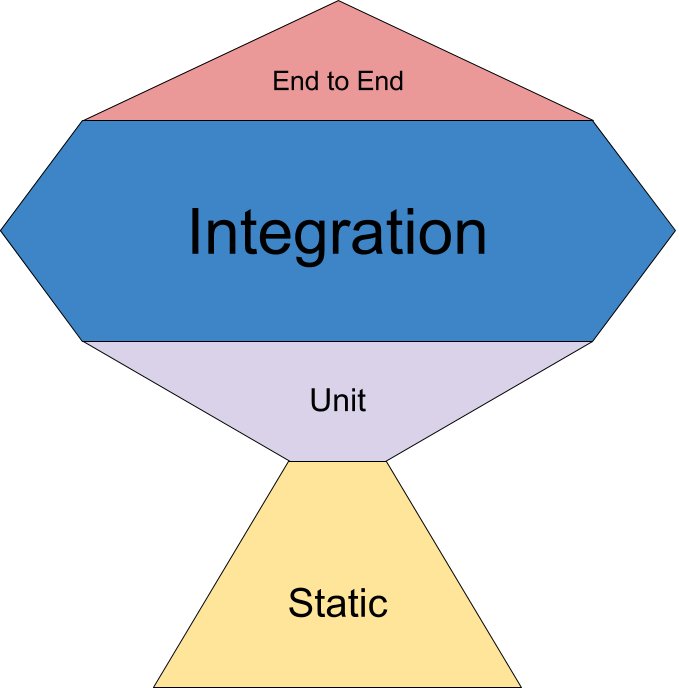
From @kentcdodds tweet
Sunday, February 24, 2019
new talk: Testing Pyramid and Consequences
I'm giving a new talk! This Wednesday in Pasadena for the LA Software Testing meetup, and again soon in Santa Monica at the Testable LA meetup.
The traditional testing pyramid is a useful tool for investing in tests which deliver business value... but there are a lot of subtleties. In this talk I'll highlight each area of the Pyramid, then discuss extensions and variations, so that we all can more fully deliver wonderful quality code, quickly!
Slides on google docs: Testing Pyramid and Consequences
Here's a recording from the LA Software Testing meetup.
Resources:

The traditional testing pyramid is a useful tool for investing in tests which deliver business value... but there are a lot of subtleties. In this talk I'll highlight each area of the Pyramid, then discuss extensions and variations, so that we all can more fully deliver wonderful quality code, quickly!
Slides on google docs: Testing Pyramid and Consequences
Here's a recording from the LA Software Testing meetup.
Resources:
- Meetups: Testable LA, LA Software Testing
- Brian Okken - Test and Code podcast
- Martin Fowler - Practical Test Pyramid article
- Books: Refactoring, NoSQL Distilled
- Lisa Crispin: Agile Testing books
- Safari Online books, training videos
Wednesday, February 20, 2019
tradeoffs of having a distributed company
if y'all have a company and are considering making it mostly remote/distributed, track down talks by Mitchell "Hashicorp" Hashimoto. His co makes Vagrant and Terraform and Packer and Vault. Anyway he gave a talk in which he talked about having a mostly-distributed company. He said a lot of things were much cheaper (renting offices), but a lot of things were more expensive/awkward (per-site licensing for video equipment). Overall he called it "a wash"
Here's the talk, recorded at Replicated in Culver City, CA => https://www.youtube.com/watch?v=iV5doaYReyU
Here's the talk, recorded at Replicated in Culver City, CA => https://www.youtube.com/watch?v=iV5doaYReyU
Wednesday, November 21, 2018
importing AWS resources into Terraform
Terraform is a wonderful tool! It helps simplify DevOps work. It turns the thorny bramble of delicate networking, users, databases, and virtual machines into a simple and well-running machine. It allows us to chant "infrastructure as code" to the amusement of well-meaning technologists. Best of all: it lets us have consistent environments. A dev can wreak havoc, learn things, then create a Terraform patch that applies to the entire collection of systems, making everything just a little bit cleaner and better understood.
Terraform, although being a moderately baked and flexible tool, has a few warts. One challenge is that it doesn't play with manually-created resources very well. If you create some users in Terraform, and some users in the AWS Console, applying Terraform later will try to delete the manual users. Terraform imagines that it is the alpha and omega, and that all things are as it thinks they are.
Additionally, Terraform isn't very smart about importing manually-created resources. Traditionally we have to use a third-party tool, terraforming, to do this task. The combination of terraform (to create/update resources) and terraforming (to import manually-created resources) is useful.
Example: here's how to import all the SNS Topics ("snst") to a Terraform file:
$ AWS_PROFILE=myprofile terraforming snst --region=myregion | tee temp-sns.tf
resource "aws_sns_topic" "dynamodb" {
name = "dynamodb"
display_name = ""
policy = ...
}
Now, edit the temp-sns.tf file to make things more clear and regular, then plan and apply with Terraform as per usual.
In AWS, users aren't just users, they're defined in several different types of Identity and Access Management (IAM) resources. Here's how to import just the simple user records:
AWS_PROFILE=myprofile terraforming iamu --region=myregion | tee temp-iamu.tf
resource "aws_iam_user" "john" {
name = "john@johntellsall.com"
path = "/"
}
In practice, users aren't useful except as combined with Roles, Groups, and Policies. It's a whole thing. Fortunately, here's a bit of code which imports all AWS IAM user-related permissions into a single Terraform file:
terraforming help | egrep -o 'iam\w+' | AWS_PROFILE=myprofile xargs -I{} -t terraforming {} --region=myregion >> temp-users.tf
Now, you'll be left with a 1,000-line Terraform file for further editing. This isn't that fun, however once you're done, you can move this file into its own module, and apply the same users/groups/permissions on all your environments!
Terraform is a wonderful tool, and in combination with Terraforming and a bit of work, will make your DevOps work a lot simpler!
Terraform, although being a moderately baked and flexible tool, has a few warts. One challenge is that it doesn't play with manually-created resources very well. If you create some users in Terraform, and some users in the AWS Console, applying Terraform later will try to delete the manual users. Terraform imagines that it is the alpha and omega, and that all things are as it thinks they are.
Additionally, Terraform isn't very smart about importing manually-created resources. Traditionally we have to use a third-party tool, terraforming, to do this task. The combination of terraform (to create/update resources) and terraforming (to import manually-created resources) is useful.
Example: here's how to import all the SNS Topics ("snst") to a Terraform file:
$ AWS_PROFILE=myprofile terraforming snst --region=myregion | tee temp-sns.tf
resource "aws_sns_topic" "dynamodb" {
name = "dynamodb"
display_name = ""
policy = ...
}
Now, edit the temp-sns.tf file to make things more clear and regular, then plan and apply with Terraform as per usual.
In AWS, users aren't just users, they're defined in several different types of Identity and Access Management (IAM) resources. Here's how to import just the simple user records:
AWS_PROFILE=myprofile terraforming iamu --region=myregion | tee temp-iamu.tf
resource "aws_iam_user" "john" {
name = "john@johntellsall.com"
path = "/"
}
In practice, users aren't useful except as combined with Roles, Groups, and Policies. It's a whole thing. Fortunately, here's a bit of code which imports all AWS IAM user-related permissions into a single Terraform file:
terraforming help | egrep -o 'iam\w+' | AWS_PROFILE=myprofile xargs -I{} -t terraforming {} --region=myregion >> temp-users.tf
Now, you'll be left with a 1,000-line Terraform file for further editing. This isn't that fun, however once you're done, you can move this file into its own module, and apply the same users/groups/permissions on all your environments!
Terraform is a wonderful tool, and in combination with Terraforming and a bit of work, will make your DevOps work a lot simpler!
Thursday, November 15, 2018
Docker leads to so much win (psql ftw)
Containers are an incredibly effective way to be more productive. I'd put it on the same order of convenience as version control: a bit of effort to learn but each technology allows tremendous flexibility and safety and enjoyment out of programming.
Just now I wanted to verify my backups. I didn't want to run Postgres directly on my macOS, as I'm going to nuke the database after a few tests. So instead I started one in its own container. I ran it on a weird port so I couldn't accidentally use the wrong database/proxy:
$ docker run --name temp_postgres -p 5555:5432 -d postgres:9.6
Next I verify my new database is up and answering commands:
$ PGPASSWORD='' psql postgresql://postgres@localhost:5555/postgres -c 'select now()'
now
-------------------------------
2018-11-16 00:32:31.104194+00
(1 row)
The commands worked on the first try! Now I can go ahead and do my real work of verifying backups, then my task will be finished and I'll move on to the next one. Win!
Just now I wanted to verify my backups. I didn't want to run Postgres directly on my macOS, as I'm going to nuke the database after a few tests. So instead I started one in its own container. I ran it on a weird port so I couldn't accidentally use the wrong database/proxy:
$ docker run --name temp_postgres -p 5555:5432 -d postgres:9.6
Next I verify my new database is up and answering commands:
$ PGPASSWORD='' psql postgresql://postgres@localhost:5555/postgres -c 'select now()'
now
-------------------------------
2018-11-16 00:32:31.104194+00
(1 row)
The commands worked on the first try! Now I can go ahead and do my real work of verifying backups, then my task will be finished and I'll move on to the next one. Win!
Sunday, November 11, 2018
fast searches with custom search engines
I do a lot of learning, which today means tons of searching on different websites. I've found a trick which makes my job a lot faster -- custom search aliases. In the URL bar, I can type "k explain" to automatically go to the Kubernetes.io site, search for "explain", and give me the results. When I need another cat image for one of my presentations, I type "gis cat" into the URL bar to ask Google Image Search for some inspirational furriness. Man.cx has all the Linux manpages. Python.org has all the Python modules carefully documented. I have aliases for all of the above and use them constantly.
Here's how to make your daily searches much, much easier:
1. go to site, do search. Example: https://kubernetes.io, search for "explain"
2. URL has term in bar. Replace it with "%s". For the above example you'll get https://kubernetes.io/docs/search/?q=%s
3. copy URL
4. right click URL, select "Edit Search Engines"
5. under Other Search Engines, click Add button
6. type something for Search Engine ("kubernetes"), then a short alias ("k"), and for the URL, paste the URL with "%s" in it
7. click Add
In URL bar, type alias then another search term. e.g. "k beer". The resulting page will be a Search Results page, with your new term in it.
Here's how to make your daily searches much, much easier:
Easy, very fast keyword searches
1. go to site, do search. Example: https://kubernetes.io, search for "explain"
2. URL has term in bar. Replace it with "%s". For the above example you'll get https://kubernetes.io/docs/search/?q=%s
3. copy URL
4. right click URL, select "Edit Search Engines"
5. under Other Search Engines, click Add button
6. type something for Search Engine ("kubernetes"), then a short alias ("k"), and for the URL, paste the URL with "%s" in it
7. click Add
Testing
In URL bar, type alias then another search term. e.g. "k beer". The resulting page will be a Search Results page, with your new term in it.
Compatibility
The above instructions are for Google Chrome, but all browsers support something like this.
Friday, July 20, 2018
TIP: Bash has “global search and replace”!
TIP: Bash has “global search and replace”! It works with the history mechanism. Example, the bangbang (!!) command repeats the previous command:
$ !! # repeat previous command
Adding a colon (:) and then a letter or two will modify the command before running it. A useful modifier is "p" for printing. That is:
$ !!:p # repeat previous command, but just :p-print it
This is useful because you can use up-arrow to now go to the previous command and edit it interactively.
For non-interactive editing, you can do global search and replace! Example: use the "repeat previous command" command, bangbang (!!). Then modify it (:), then say "global search" (gs). To do this to find "one" and replace it with "two", use this command:
$ !!:gs/one/two
In my real-world case, I'd already run a command to deploy my Development server with Terraform. The specific command is:
AWS_PROFILE=development terraform plan -var-file=../config/development.tfvars
This command was in my shell history. I want to recall this command (bangbang, aka !!), then search and replace "development" with "staging" to use Terraform to deploy to my staging environment.
Command:
$ !!:gs/development/staging
Got me:
AWS_PROFILE=staging terraform plan -var-file=../config/staging.tfvars
- Bash scripting cheatsheet
$ !! # repeat previous command
Adding a colon (:) and then a letter or two will modify the command before running it. A useful modifier is "p" for printing. That is:
$ !!:p # repeat previous command, but just :p-print it
This is useful because you can use up-arrow to now go to the previous command and edit it interactively.
For non-interactive editing, you can do global search and replace! Example: use the "repeat previous command" command, bangbang (!!). Then modify it (:), then say "global search" (gs). To do this to find "one" and replace it with "two", use this command:
$ !!:gs/one/two
In my real-world case, I'd already run a command to deploy my Development server with Terraform. The specific command is:
AWS_PROFILE=development terraform plan -var-file=../config/development.tfvars
This command was in my shell history. I want to recall this command (bangbang, aka !!), then search and replace "development" with "staging" to use Terraform to deploy to my staging environment.
Command:
$ !!:gs/development/staging
Got me:
AWS_PROFILE=staging terraform plan -var-file=../config/staging.tfvars
Resources:
- Bash scripting cheatsheet
running My Traceroute (aka Matt's traceroute) (MTR) on macOS
Mtr is a wonderful program that combines ping and traceroute. It shows you each hop along a path to another host on the internet, and how long each hop takes. It's my #1 go-to tool to debug wifi / networking / DNS issues. And, it's pretty!
Anyway it requires extra privileges, so it's a bit fiddly to run. Even worse, The Internet Is Wrong on this topic, there's lots of bad advice.
Here's how to install and run mtr on a macOS machine:
brew install mtr
PATH=$PATH:/usr/local//Cellar/mtr/0.92/sbin sudo mtr 8.8.8.8
The "8.8.8.8" is a magic IP. Easy to remember, it's a public DNS router that our friends at Google make available to the public. You can use any IP or domain name here. I use the all-8s IP, because sometimes my DNS isn't working, so pinging a raw IP will tell me if my DNS is acting up, and if so, which one.
Here's what it looks like:

If you press d, it switches displays to more visual. This lets the "bad actors" in the network jump out:

Since this is a terminal-based CLI program it's easy to install and run on a server. Maybe your local network is good, but the server's network or DNS is acting up -- mtr will make issues really easy to see and fix!
Thursday, July 19, 2018
tech book recommendations
Recently I was asked about Python books covering Object Oriented programming for someone coming from another language. Here are some resources:
- I recommend subscribing to Safari Books Online. They have jillions of books and videos, including "Python Beyond The Basics - Object Oriented Programming" (high-ranked video). It's $40/month. If you're a professional Dev or DevOps, or trying to be, it's an easy investment.
- the class section of "Modern Python Cookbook" (book) has tons of real-world Python idioms: designing classes with lots vs little processing, classes with __slots__, and advanced class design... Actually this book looks great I'm going to read it.
- David Beazley's "Python Cookbook" is great, overflowing with real-world problems, solutions, and discussion.
- in the Los Angeles region all the Lynda.com tech resources are freeee with an LA public library card.
- the "Cookbook" books I find are good for someone coming from another language, the books don't spend 100 pages talking about dictionaries and strings and so forth. It turns out there's tons of Cookbooks nowadays: data visualization, machine learning, testing, you name it!
- I recommend subscribing to Safari Books Online. They have jillions of books and videos, including "Python Beyond The Basics - Object Oriented Programming" (high-ranked video). It's $40/month. If you're a professional Dev or DevOps, or trying to be, it's an easy investment.
- the class section of "Modern Python Cookbook" (book) has tons of real-world Python idioms: designing classes with lots vs little processing, classes with __slots__, and advanced class design... Actually this book looks great I'm going to read it.
- David Beazley's "Python Cookbook" is great, overflowing with real-world problems, solutions, and discussion.
- in the Los Angeles region all the Lynda.com tech resources are freeee with an LA public library card.
- the "Cookbook" books I find are good for someone coming from another language, the books don't spend 100 pages talking about dictionaries and strings and so forth. It turns out there's tons of Cookbooks nowadays: data visualization, machine learning, testing, you name it!
Friday, July 6, 2018
Kafka on macOS
Generally I run everything in Docker: it's less fiddly, and I can do a clean uninstall very easily. Alas Docker networking is different, and changes every few months as Docker makes things easier... by changing the networking.
As of July 2018 here's the easiest way I've found to run Kafka on macOS:
brew install kafka kafkacat zookeeper
brew services start zookeeper
brew services start kafka
Once Kafka is up, list out the brokers:
$ kafkacat -L -b localhost
Metadata for all topics (from broker -1: localhost:9092/bootstrap):
1 brokers:
broker 0 at 192.168.0.133:9092
0 topics:
Now let's go to the mysterious directory that has tons of good tools. Create a topic, then use "kafkacat" again to verify our new topic has been created:
$ cd /usr/local/Cellar/kafka/*/libexec/bin
./kafka-topics.sh --create --topic example-topic --zookeeper localhost:2181 --partitions 1 --replication-factor 1
$ kafkacat -L -b localhost
Metadata for all topics (from broker -1: localhost:9092/bootstrap):
1 brokers:
broker 0 at 192.168.0.133:9092
1 topics:
topic "example-topic" with 1 partitions:
partition 0, leader 0, replicas: 0, isrs: 0
Woot! My thanks to springheeledjak and pkafel!
As of July 2018 here's the easiest way I've found to run Kafka on macOS:
brew install kafka kafkacat zookeeper
brew services start zookeeper
brew services start kafka
Once Kafka is up, list out the brokers:
$ kafkacat -L -b localhost
Metadata for all topics (from broker -1: localhost:9092/bootstrap):
1 brokers:
broker 0 at 192.168.0.133:9092
0 topics:
Now let's go to the mysterious directory that has tons of good tools. Create a topic, then use "kafkacat" again to verify our new topic has been created:
$ cd /usr/local/Cellar/kafka/*/libexec/bin
./kafka-topics.sh --create --topic example-topic --zookeeper localhost:2181 --partitions 1 --replication-factor 1
$ kafkacat -L -b localhost
Metadata for all topics (from broker -1: localhost:9092/bootstrap):
1 brokers:
broker 0 at 192.168.0.133:9092
1 topics:
topic "example-topic" with 1 partitions:
partition 0, leader 0, replicas: 0, isrs: 0
Woot! My thanks to springheeledjak and pkafel!
Saturday, June 23, 2018
Quality Code in Practice
Developers like to write code. They like to type fast, to work fast, and deploy fast. This is fine. We all like this, it's fun!
A more high-level view is that as a business, as a team we want to deliver value fast. This is harder: which value to what audience are we serving? If we deliver buggy code to the client, no one is happy. If we make some users happy but our core audience is not served, then we haven't really delivered on our goals. Our goal as professionals, as entrepreneurs, is to find/create an audience, and serve that audience by giving them value.
In practice, "clean" code helps us work fast and also deliver value to our audience. Clean in this case meaning free of bugs, clearly designed, and of a design which directly meets the needs of our audience.
Automated workflow tools can help us move forward. They run very quickly, giving us positive feedback that what we write is legible and missing the most egregious errors. The basic categories of tools are 1) surface-level syntax, 2) language-centric analysis, 3) project-based unit and other tests.
For a recent project, this is our top-level Makefile. It lets us as developers get rapid feedback on the quality of our project. Also, having a single file lets these tasks be repeatable by a Continuous Integration system, so we can be confident things don't break if we had too much coffee and committed something without running tests.
all:
auto-fix:
git ls-files '*.py' \
| xargs autopep8 --in-place --aggressive
lint:
flake8
clean:
find . -name '*.pyc' | xargs rm
run:
cd cj ; ./manage.py run
test:
pytest
A more high-level view is that as a business, as a team we want to deliver value fast. This is harder: which value to what audience are we serving? If we deliver buggy code to the client, no one is happy. If we make some users happy but our core audience is not served, then we haven't really delivered on our goals. Our goal as professionals, as entrepreneurs, is to find/create an audience, and serve that audience by giving them value.
In practice, "clean" code helps us work fast and also deliver value to our audience. Clean in this case meaning free of bugs, clearly designed, and of a design which directly meets the needs of our audience.
Automated workflow tools can help us move forward. They run very quickly, giving us positive feedback that what we write is legible and missing the most egregious errors. The basic categories of tools are 1) surface-level syntax, 2) language-centric analysis, 3) project-based unit and other tests.
For a recent project, this is our top-level Makefile. It lets us as developers get rapid feedback on the quality of our project. Also, having a single file lets these tasks be repeatable by a Continuous Integration system, so we can be confident things don't break if we had too much coffee and committed something without running tests.
all:
auto-fix:
git ls-files '*.py' \
| xargs autopep8 --in-place --aggressive
lint:
flake8
clean:
find . -name '*.pyc' | xargs rm
run:
cd cj ; ./manage.py run
test:
pytest
Monday, June 18, 2018
Easy Docker
This talk was given at the LA Django meetup in DTLA on 6/19/2018. My thanks to Anthony at Gridspace for sponsoring! Also thanks to Marcel for inviting me again.
This page is http://bit.ly/jta-easy-docker
The slides are in Googledocs, source code is in Github => https://github.com/johntellsall/easy-docker
This page is http://bit.ly/jta-easy-docker
The slides are in Googledocs, source code is in Github => https://github.com/johntellsall/easy-docker
Thursday, June 14, 2018
Testing Pyramid and Feedback Loops (Platonic Solids of Quality)
This talk was given 6/14/2018 in sunny downtown Santa Monica, at Carbon Five. Rit Li's Testable group is all about, well, testing, especially for webapps. Given my focus on being an expert at "quality, dev, and devops", this group is perfect for me!
Here's the event link => https://www.meetup.com/testable/events/jsjqjpyxjbkb/
Here are the slides, in Google Docs => Testing Pyramid and Feedback Loops
This page is http://bit.ly/jta-platonic2 , I'll add more to it as different versions of the talk appear. Please send me photos!
Here's the event link => https://www.meetup.com/testable/events/jsjqjpyxjbkb/
Here are the slides, in Google Docs => Testing Pyramid and Feedback Loops
This page is http://bit.ly/jta-platonic2 , I'll add more to it as different versions of the talk appear. Please send me photos!
Thursday, June 7, 2018
Appearances June 2018
hi all! Here are upcoming events at which I'll be speaking
- 6/7: private event, talking about Infrastructure as Code on a panel
This is going to be fun! I haven't spoken on a panel before. The audience is a bit different, C-level executives. I won't have any slides filled with dense code, but I will have a cat t-shirt. My goal is to sip wine, be quiet, and support my fellow speakers.
- 6/14 at Testable LA, I'll be talking about the Testing Pyramid and Feedback Loops. Feel free to come by and say hi! Meetup link => Testable LA: Monthly Meetup
This talk is an expansion of my Platonic Solids of Quality work. In this update I'll skim over the Testing Pyramid, then enumerate the different Feedback patterns we use to write code but also steer the ship of our company.
The traditional Testing Pyramid has higher-level UI tests on top, medium-level API tests in the middle, and small Unit Tests on the bottom. Tests higher in the pyramid run more code, but also give less specific feedback about exactly what's going on. Low level unit tests are great in that they're super fast, easy to write, and allow us to validate exactly which inputs correspond to exactly which outputs. In practical, for-real, professional projects, how much effort should be spent at which types of tests? How do we as a team achieve our goal with the least amount of chaos and drama?
- 6/7: private event, talking about Infrastructure as Code on a panel
This is going to be fun! I haven't spoken on a panel before. The audience is a bit different, C-level executives. I won't have any slides filled with dense code, but I will have a cat t-shirt. My goal is to sip wine, be quiet, and support my fellow speakers.
- 6/14 at Testable LA, I'll be talking about the Testing Pyramid and Feedback Loops. Feel free to come by and say hi! Meetup link => Testable LA: Monthly Meetup
This talk is an expansion of my Platonic Solids of Quality work. In this update I'll skim over the Testing Pyramid, then enumerate the different Feedback patterns we use to write code but also steer the ship of our company.
The traditional Testing Pyramid has higher-level UI tests on top, medium-level API tests in the middle, and small Unit Tests on the bottom. Tests higher in the pyramid run more code, but also give less specific feedback about exactly what's going on. Low level unit tests are great in that they're super fast, easy to write, and allow us to validate exactly which inputs correspond to exactly which outputs. In practical, for-real, professional projects, how much effort should be spent at which types of tests? How do we as a team achieve our goal with the least amount of chaos and drama?
Wednesday, May 23, 2018
CI Tip: block insecure changes to your source code
As a dev or devops person, it's pretty easy to accidentally expose AWS or other secrets by putting them into "temporary" code or environment files. Once a secret appears in version control, it should no longer be trusted, go ahead and rotate the key.
Here's how to write a checker, so that secrets won't make it into source code! This is perfect for a Git commit hook. The important feature to use is Perl-style regular expressions, which allow you to say "match this exactly N number of times". Also, the "-w" flag to Ack lets us match word boundaries. Thus, if something is a word, and exactly some number of characters long, we flag it.
Example:
$ echo 'I love gin' | ack -w '[a-z]{3}'
I love gin
This example finds words of exactly three letters. The word "gin" is found, as it's exactly three characters. The second word "love" is not flagged, even though it has 3 characters included in it, because we added the "-w" flag to only find words. "Gin" has a non-letter on either side, so it's a word, so we match it.
To catch AWS keys, search for "words" of exactly 20 characters, uppercase letters and numbers only:
$ ack -lw '[0-9A-Z]{20}'
env-sales
web-services/src/config/configResolver.ts
.env
Ah: two local environment files have AWS keys, which is okay. These are not checked in to Git. However, a key snuck in to another file, in source code! Now that Ack alerted me to a mislaid key, I can go fix it and make our system more secure. Win!
Here's how to write a checker, so that secrets won't make it into source code! This is perfect for a Git commit hook. The important feature to use is Perl-style regular expressions, which allow you to say "match this exactly N number of times". Also, the "-w" flag to Ack lets us match word boundaries. Thus, if something is a word, and exactly some number of characters long, we flag it.
Example:
$ echo 'I love gin' | ack -w '[a-z]{3}'
I love gin
This example finds words of exactly three letters. The word "gin" is found, as it's exactly three characters. The second word "love" is not flagged, even though it has 3 characters included in it, because we added the "-w" flag to only find words. "Gin" has a non-letter on either side, so it's a word, so we match it.
To catch AWS keys, search for "words" of exactly 20 characters, uppercase letters and numbers only:
$ ack -lw '[0-9A-Z]{20}'
env-sales
web-services/src/config/configResolver.ts
.env
Ah: two local environment files have AWS keys, which is okay. These are not checked in to Git. However, a key snuck in to another file, in source code! Now that Ack alerted me to a mislaid key, I can go fix it and make our system more secure. Win!
Monday, May 21, 2018
Sublime tips and tricks
https://generalassemb.ly/blog/sublime-text-3-tips-tricks-shortcuts/
Things I learned:
- ⌘-SHIFT-J = select everything that's similarly indented
- CTRL-⌘-UP = move selection up (vs dragging the region with the mouse)
- CTRL-SHIFT-K = delete entire current line. I used to do ⌘-L, Delete dozens of times a day. Now there's another way!
Things I learned:
- ⌘-SHIFT-J = select everything that's similarly indented
- CTRL-⌘-UP = move selection up (vs dragging the region with the mouse)
- CTRL-SHIFT-K = delete entire current line. I used to do ⌘-L, Delete dozens of times a day. Now there's another way!
TIP: you can exclude file types when searching for stuff in Git!
Git isn't just a database, it's a comprehensive searching system XX. You can exclude file types when searching for stuff in Git!
Example: the Development branch broke some time between two Git commits. I want to find the error but don't want to look at huge piles of changes. I don’t think the front end Vue files broke the build, so let's find changes excluding those files, so I can find the error.
First, I list the files between the two commits, to see if it’s roughly what I want:
git diff --stat c7b5d2d^..2de4986 -- ':(exclude)*.vue'
Looks good. Next, I list the actual content by zapping the "--stat" argument:
^--stat^
Or: git diff c7b5d2d^..2de4986 -- ':(exclude)*.ts'
I found the problem! Yay, Git!
More info:
- Git pathspec
- Bash "Event Designators" (the upcaret to search and replace previous line)
Example: the Development branch broke some time between two Git commits. I want to find the error but don't want to look at huge piles of changes. I don’t think the front end Vue files broke the build, so let's find changes excluding those files, so I can find the error.
First, I list the files between the two commits, to see if it’s roughly what I want:
git diff --stat c7b5d2d^..2de4986 -- ':(exclude)*.vue'
Looks good. Next, I list the actual content by zapping the "--stat" argument:
^--stat^
Or: git diff c7b5d2d^..2de4986 -- ':(exclude)*.ts'
I found the problem! Yay, Git!
More info:
- Git pathspec
- Bash "Event Designators" (the upcaret to search and replace previous line)
Subscribe to:
Posts (Atom)
